
Intel Manipulator Integration#
Overview#
The movensys_intel_ws workspace is a standalone ROS 2 application that integrates MoveIt2 with WMX ROS2 for manipulator control on Intel x86_64 platforms. It provides a progressive 3-stage workflow that takes the Dobot CR3A from basic trajectory validation through vision-guided pick-and-place with real-time obstacle avoidance – all using CPU-based algorithms.
The workspace is located at:
~/workspaces/movensys_intel_ws/
Stage |
Capability |
Description |
Key Component |
|---|---|---|---|
1 |
Basic Trajectory |
Cartesian/joint motion with MoveIt2 OMPL planner |
MoveIt2 (OMPL/CHOMP/Pilz) |
2 |
AprilTag Pick & Place |
Vision-based detection and autonomous manipulation |
|
3 |
OctoMap Obstacle Avoidance |
3D voxel mapping for collision-free planning |
OctoMap + Intel RealSense depth |
Each stage can run in three environments:
Simulation – Gazebo provides physics simulation and sensor emulation. The
simulation_actionbridge node forwards MoveIt2 trajectories to the/gazebo_position_controller/commandstopic (8 values: 6 joints + 2 gripper).Hardware-in-the-Loop (HiL) – Gazebo acts as a digital twin while the real robot is driven by WMX ROS2 over EtherCAT. Both systems share the same
/joint_statestopic.Real Robot – No simulator. WMX ROS2 drives the physical robot directly and MoveIt2 plans in real time.
Architecture#
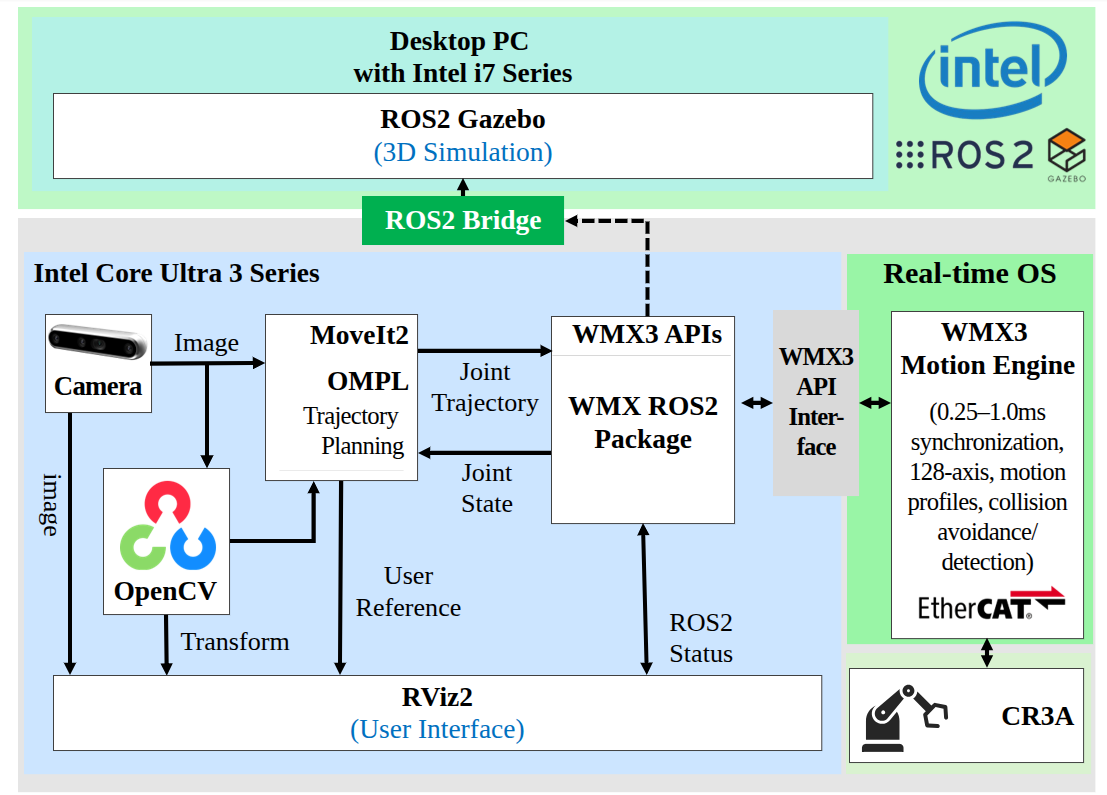
Intel Manipulator — system architecture overview#
Packages#
The workspace contains five ROS 2 packages (plus copies of the core WMX ROS2 packages):
Package |
Purpose |
|---|---|
|
URDF/Xacro robot model for the Dobot CR3A with table, stand, bracket,
gripper, and picker links. Provides STL mesh assets, Gazebo simulation
support ( |
|
MoveIt2 configuration: SRDF, joint limits, KDL kinematics solver,
OMPL/CHOMP/Pilz planners, controller configuration, stage executables
( |
|
Intel-platform-specific bringup launch files, additional demo
executables ( |
|
Core WMX ROS2 driver package (copied into the workspace). |
|
Core WMX ROS2 message definitions (copied into the workspace). |
Kinematic Chain#
world -> world_manipulator -> table -> stand -> Link0
  -> joint1 (revolute) -> Link1
    -> joint2 (revolute) -> Link2
      -> joint3 (revolute) -> Link3
        -> joint4 (revolute) -> Link4
          -> joint5 (revolute) -> Link5
            -> joint6 (revolute) -> Link6
              -> bracket (fixed) -> gripper (fixed)
                -> picker_1_joint (prismatic, 0--0.045 m) -> picker_1
                -> picker_2_joint (prismatic, 0--0.045 m) -> picker_2
The arm group movensys_manipulator_arm is defined as the chain from
Link0 to Link6 (6 revolute joints: joint1 through joint6, each
with limits of -3.14 to 3.14 rad). The end-effector group
movensys_manipulator_eef includes the bracket and gripper links.
The URDF is composed from four xacro files:
stage.xacro– World frame, table, and stand (static links)cr3a.xacro– CR3A 6-DOF arm macro with link inertials and STL meshescontrol.xacro–gz_ros2_controlhardware interface (position command for all 8 joints)transmission.xacro–SimpleTransmissionfor each joint
Source Files#
movensys_manipulator_moveit_config executables:
Source File |
Description |
|---|---|
|
Gazebo bridge: subscribes to |
|
Shared |
|
Stage 1 demo: absolute Cartesian, relative base Cartesian, relative
tool Cartesian, joint movement, and gripper open/close.
|
|
Stage 2 demo: AprilTag visual servoing pick-and-place. Tracks 4 tags
( |
|
Stage 3 demo: OctoMap obstacle-aware planning. Phase 1 scans 4 poses to
build OctoMap (3 s dwell per pose). Phase 2-4 execute Cartesian, joint,
and relative movements with OMPL planning around obstacles.
|
|
Python ROS 2 node using |
movensys_manipulator_intel_config executables:
Source File |
Description |
|---|---|
|
Trajectory demo: absolute Cartesian, relative base/tool Cartesian,
joint movement, and gripper operation. |
|
8-step pick-and-place demo: home -> open gripper -> pre-pick ->
pick (Cartesian descent, |
Data Flow#
Simulation mode (Gazebo):
MoveIt2 (OMPL/CHOMP/Pilz)
  -> FollowJointTrajectory action
    -> simulation_action node
      -> /gazebo_position_controller/commands (Float64MultiArray, 8 values)
        -> Gazebo gz_ros2_control
          -> /joint_states -> MoveIt2
Hardware-in-the-Loop (Gazebo + WMX ROS2):
MoveIt2 (OMPL/CHOMP/Pilz)
  -> FollowJointTrajectory action
    -> WMX ROS2 action server -> EtherCAT -> Dobot CR3A
    -> simulation_action -> Gazebo (digital twin)
  <- /joint_states <- WMX ROS2
Real Robot (WMX ROS2 only):
MoveIt2 (OMPL/CHOMP/Pilz)
  -> FollowJointTrajectory action
    -> WMX ROS2 action server -> EtherCAT -> Dobot CR3A
  <- /joint_states <- WMX ROS2
Prerequisites#
Hardware#
Intel x86_64 PC (Ubuntu 22.04 or 24.04)
Dobot CR3A 6-DOF collaborative robot arm
WMX EtherCAT motion controller (for physical robot operation)
Intel RealSense camera (for Stages 2 and 3 – mounted on Link6)
Software#
ROS 2 Humble (Ubuntu 22.04) or Jazzy (Ubuntu 24.04)
MoveIt2 (
moveit_ros_planning_interface,moveit_msgs)Gazebo (
ros_gz_sim,gz_ros2_control) for simulation modeCycloneDDS middleware (
rmw_cyclonedds_cpp)LMX(WMX Runtime) installed at
/opt/wmx3/for hardware controlPython packages:
pyapriltags,scipy(for Stage 2)realsense2_cameraROS 2 package (for Stages 2 and 3)
Installation#
Create the workspace:
mkdir -p ~/workspaces/movensys_intel_ws/src
cd ~/workspaces/movensys_intel_ws/src
Clone the repositories:
git clone https://github.com/movensys/movensys_intel_manipulator.git
Install ROS 2 dependencies:
cd ~/workspaces/movensys_intel_ws
rosdep install --from-paths src --ignore-src -r -y
Install Python dependencies (for AprilTag detection):
pip install pyapriltags scipy
Configure the environment (add to
~/.bashrc):source /opt/ros/${ROS_DISTRO}/setup.bash export RMW_IMPLEMENTATION=rmw_cyclonedds_cpp
Build the workspace:
cd ~/workspaces/movensys_intel_ws
colcon build --symlink-install
source install/setup.bash
Configuration#
MoveIt2 Configuration#
The MoveIt2 configuration is in movensys_manipulator_moveit_config/config/:
File |
Description |
|---|---|
|
Arm group |
|
MoveIt URDF: includes the description xacro and adds
|
|
All joints: |
|
KDL kinematics solver: resolution 0.005, timeout 0.1 s. |
|
|
|
OctoMap sensor plugin:
|
RealSense Camera Configuration#
Two RealSense configurations are provided in movensys_manipulator_moveit_config/config/:
File |
Description |
|---|---|
|
Color only: 640x480 at 15 fps. Depth disabled. Used for AprilTag detection (Stage 2). |
|
Color + depth: 640x480 at 15 fps for both streams. Pointcloud and depth alignment enabled. Used for OctoMap (Stage 3). |
Gazebo Simulation Configuration#
The Gazebo controller is configured in movensys_manipulator_description/urdf/control.yaml:
Controller manager update rate: 200 Hz
gazebo_position_controller:JointGroupPositionControllerfor all 8 joints (6 arm + 2 gripper) with per-joint PID gainsjoint_state_broadcaster: publishes/joint_states
AprilTag Configuration#
The AprilTag configuration for the Intel platform is in
movensys_manipulator_intel_config/config/apriltag_config.yaml:
Tag family:
tag36h11Tag size: 0.04 m (40 mm)
Minimum detections for stability: 5
Detector parameters:
nthreads=2,quad_decimate=2.0,refine_edges=trueCamera mount: Link6 parent, z offset 0.04 m, roll and yaw 90 degrees
Launch Files#
movensys_manipulator_description launches (Gazebo simulation):
Launch File |
Description |
|---|---|
|
Full Gazebo simulation: spawns robot, loads
|
|
Hardware-in-the-loop: Gazebo with |
|
Identical to |
movensys_manipulator_moveit_config launches:
Launch File |
Description |
|---|---|
|
MoveIt2: |
|
RealSense camera driver with configurable camera mount TF (Link6 -> camera_hand_link). Default: z offset 0.05 m. |
|
Launches |
|
Launches |
|
Full OctoMap pipeline: RealSense (depth + pointcloud),
camera mount TF, |
movensys_manipulator_intel_config launches:
Launch File |
Description |
|---|---|
|
System bringup: includes MoveIt2 launch and WMX ROS2 driver
( |
|
MoveIt2 with |
|
Launches |
|
Launches |
|
Full stack: MoveIt2 + WMX driver + RealSense + AprilTag detection.
Args: |
|
RealSense camera + AprilTag detector + camera mount static TF. Configurable: color/depth resolution, camera serial, tag parameters, camera mount position (parent: Link6, default z: 0.04 m). |
|
USB webcam AprilTag detection for testing without RealSense. |
Usage#
Stage 1: Basic Trajectory#
Stage 1 validates motion planning and execution with MoveIt2. It exercises all motion types: absolute Cartesian, relative base/tool Cartesian, joint movement, and gripper control.
1a. Simulation (Gazebo):
Terminal 1 – Start Gazebo simulation:
ros2 launch movensys_manipulator_description simulation_1.launch.py
Terminal 2 – Start the simulation bridge:
ros2 run movensys_manipulator_moveit_config simulation_action
Terminal 3 – Start MoveIt2:
ros2 launch movensys_manipulator_moveit_config movensys_manipulator_moveit.launch.py use_sim_time:=true
Terminal 4 – Run Stage 1 trajectory:
ros2 launch movensys_manipulator_moveit_config stage1_trajectory.launch.py use_sim_time:=true
1b. Hardware-in-the-Loop (Gazebo + WMX ROS2):
Terminal 1 – Start Gazebo HIL:
ros2 launch movensys_manipulator_description hil_1.launch.py
Terminal 2 – Start WMX ROS2 driver:
sudo --preserve-env ros2 launch wmx_ros2_package wmx_ros2_manipulator_dobot_cr3a.launch.py
Terminal 3 – Start MoveIt2:
ros2 launch movensys_manipulator_moveit_config movensys_manipulator_moveit.launch.py
Terminal 4 – Run Stage 1 trajectory:
ros2 launch movensys_manipulator_moveit_config stage1_trajectory.launch.py
1c. Real Robot (WMX ROS2 only):
Terminal 1 – Start Gazebo for visualization:
ros2 launch movensys_manipulator_description demo_1.launch.py
Terminal 2 – Start WMX ROS2 driver:
sudo --preserve-env ros2 launch wmx_ros2_package wmx_ros2_manipulator_dobot_cr3a.launch.py
Terminal 3 – Start MoveIt2:
ros2 launch movensys_manipulator_moveit_config movensys_manipulator_moveit.launch.py
Terminal 4 – Run Stage 1 trajectory:
ros2 launch movensys_manipulator_moveit_config stage1_trajectory.launch.py
Alternative demos from movensys_manipulator_intel_config:
Using the bringup launch (combines MoveIt2 + WMX driver):
# Terminal 1: Bringup (MoveIt2 + WMX ROS2 driver)
sudo --preserve-env ros2 launch movensys_manipulator_intel_config bringup.launch.py

# Terminal 2: Trajectory demo
ros2 launch movensys_manipulator_intel_config trajectory_demo.launch.py

# -- OR --

# Terminal 2: Pick-and-place demo
ros2 launch movensys_manipulator_intel_config pick_and_place.launch.py
Stage 2: AprilTag Pick-and-Place#
Stage 2 adds vision-guided manipulation using Intel RealSense camera and
CPU-based AprilTag detection via pyapriltags. The robot detects
tag36h11 tags, performs visual servoing to center the end-effector over
each tag, picks the object, and places it in a predefined box position.
The visual servoing loop works as follows:
Move to scan pose
Look up TF from
camera_hand_color_optical_frametotag36h11:<id>If tag offset exceeds tolerance (0.03 m position, 0.05 rad orientation), execute
relativeToolEefCartesiancorrectionRepeat until converged
Apply tag-to-target offset (
x=0.01,y=-0.065)Descend 0.21 m, close gripper, retract
Move to box position, release
Prerequisites:
pip install pyapriltags scipy
sudo apt install ros-${ROS_DISTRO}-realsense2-camera
2a. Hardware-in-the-Loop:
Terminal 1 – Start Gazebo HIL:
ros2 launch movensys_manipulator_description hil_1.launch.py
Terminal 2 – Start WMX ROS2 driver:
sudo --preserve-env ros2 launch wmx_ros2_package wmx_ros2_manipulator_dobot_cr3a.launch.py
Terminal 3 – Start MoveIt2:
ros2 launch movensys_manipulator_moveit_config movensys_manipulator_moveit.launch.py
Terminal 4 – Start RealSense camera:
ros2 launch movensys_manipulator_moveit_config camera_hand.launch.py
Terminal 5 – Start AprilTag detector:
ros2 run movensys_manipulator_moveit_config apriltag_detector.py
Terminal 6 – Run Stage 2 pick-and-place:
ros2 launch movensys_manipulator_moveit_config stage2_apriltag.launch.py
2b. Real Robot:
Same as 2a but replace the Gazebo HIL terminal with the demo launch:
ros2 launch movensys_manipulator_description demo_1.launch.py
Alternative (using bringup_with_vision):
# Terminal 1: Full stack (MoveIt2 + WMX + RealSense + AprilTag)
sudo --preserve-env ros2 launch movensys_manipulator_intel_config bringup_with_vision.launch.py

# Terminal 2: Stage 2 pick-and-place
ros2 launch movensys_manipulator_moveit_config stage2_apriltag.launch.py
Stage 3: OctoMap Obstacle Avoidance#
Stage 3 adds 3D obstacle awareness using OctoMap (the CPU-based equivalent of NVIDIA NvBlox). A depth camera mounted on the end-effector builds a 3D voxel map of the workspace. MoveIt2 OMPL planner uses this map to generate collision-free trajectories.
The demo runs in four phases:
Workspace scan – Move to 4 scan poses (overview, left, right, center), dwell 3 seconds at each to accumulate depth data into OctoMap
Obstacle-aware Cartesian – Execute Cartesian moves through the workspace, OMPL plans around obstacles
Obstacle-aware joint – Joint-space movements considering OctoMap obstacles
Relative movements – Relative base-frame moves with obstacle avoidance
Prerequisites:
sudo apt install ros-${ROS_DISTRO}-realsense2-camera
All-in-one launch (includes camera, OctoMap, MoveIt2, demo):
ros2 launch movensys_manipulator_moveit_config stage3_octomap.launch.py
The stage3_octomap.launch.py launch starts:
RealSense camera with depth + pointcloud (config:
realsense_hand_depth.yaml)Static TF for camera mount (Link6 -> camera_hand_link)
Robot state publisher
MoveIt2
move_groupwith OctoMap enabled (octomap_resolution=0.025,octomap_frame=world_manipulator)RViz with OctoMap visualization
stage3_octomap_cppdemo node
To skip the demo node and use interactively:
ros2 launch movensys_manipulator_moveit_config stage3_octomap.launch.py launch_demo:=false
With WMX ROS2 hardware, start the driver first:
# Terminal 1: WMX ROS2 driver
sudo --preserve-env ros2 launch wmx_ros2_package wmx_ros2_manipulator_dobot_cr3a.launch.py

# Terminal 2: OctoMap pipeline
ros2 launch movensys_manipulator_moveit_config stage3_octomap.launch.py
Comparison: Isaac vs Intel#
Feature |
Isaac (Jetson Orin) |
Intel (x86_64) |
|---|---|---|
Motion planner |
cuMotion (GPU-accelerated) |
OMPL / CHOMP / Pilz (CPU) |
AprilTag detection |
|
|
3D reconstruction |
NvBlox (GPU TSDF) |
OctoMap (CPU voxels) |
Depth sensor topic |
|
|
Simulator |
Isaac Sim (Omniverse) |
Gazebo (Open Source) |
Trajectory bridge |
|
|
Bridge values |
6 values (arm only) |
8 values (6 arm + 2 gripper) |
How It Connects to WMX ROS2#
The Intel manipulator workspace follows the same integration pattern as all WMX ROS2 applications. The connection points are:
FollowJointTrajectory action – MoveIt2 sends planned trajectories to the
WMX ROS2 action server at
/movensys_manipulator_arm_controller/follow_joint_trajectory. In simulation,
simulation_action handles this; with hardware, the WMX ROS2 driver’s action
server takes over.
Joint states – The /joint_states topic (sensor_msgs/JointState)
provides real-time joint feedback. In simulation, Gazebo publishes via
joint_state_broadcaster; with hardware, the WMX ROS2 driver publishes from
EtherCAT feedback.
Gripper control – The /wmx/set_gripper service (std_srvs/SetBool)
controls the gripper via EtherCAT digital I/O. In simulation,
simulation_action handles this by setting gripper positions in the 8-value
command array (indices 6 and 7: 0.045 = closed, 0.000 = open).
WMX ROS2 driver launch – The bringup launch file includes the WMX ROS2 driver via:
IncludeLaunchDescription(
    PythonLaunchDescriptionSource([
        FindPackageShare('wmx_ros2_package'),
        '/launch/wmx_ros2_manipulator_dobot_cr3a.launch.py'
    ])
)
This requires sudo --preserve-env because the WMX EtherCAT driver needs
kernel-level access for real-time communication.
Switching between simulation and hardware requires no code changes – only the launch configuration changes:
launch_wmx:=trueenables the WMX ROS2 driver (hardware)launch_wmx:=falsedisables it (simulation withsimulation_action)use_sim_time:=trueenables Gazebo clock synchronization