
wmx_ros2_package#
Overview#
The wmx_ros2_package is the main application package of the WMX ROS2
system. It contains all executable nodes, launch files, and configuration
files for operating a 6-DOF manipulator (Dobot CR3A) and an optional
differential drive mobile base through the WMX motion control engine.
Package Metadata:
Package Name |
|
Version |
0.0.1 |
Build Type |
|
C++ Standard |
C++17 |
Package Structure#
wmx_ros2_package/
├── CMakeLists.txt
├── package.xml
├── wmx_ros2_package/
│   └── __init__.py
├── include/
│   ├── wmx_engine_node.hpp               # WmxEngineNode class definition
│   ├── wmx_core_motion_node.hpp          # WmxCoreMotionNode class definition
│   ├── wmx_io_node.hpp                   # WmxIoNode class definition
│   └── wmx_ethercat_node.hpp             # WmxEtherCatNode class definition
├── src/
│   ├── wmx_engine_node.cpp               # Engine lifecycle node
│   ├── wmx_core_motion_node.cpp          # Axis control node
│   ├── wmx_io_node.cpp                   # Digital I/O node
│   ├── wmx_ethercat_node.cpp             # EtherCAT diagnostics node
│   ├── manipulator_state.cpp             # Joint state publisher node
│   ├── follow_joint_trajectory_server.cpp # Trajectory action server node
│   └── diff_drive_controller.cpp         # Diff drive node (disabled)
├── launch/
│   ├── wmx_ros2_multi_node.launch.py
│   ├── wmx_ros2_intel_manipulator_cr3a.launch.py
│   ├── wmx_ros2_orin_manipulator_cr3a.launch.py
│   └── wmx_ros2_diff_drive_controller.launch.py
└── config/
    ├── intel_manipulator_config_cr3a.yaml
    ├── orin_manipulator_config_cr3a.yaml
    ├── diff_drive_controller_config.yaml
    ├── cr3a_wmx_parameters.xml           # WMX3 axis params for CR3A
    └── baymax_wmx_parameters.xml         # WMX3 axis params for Baymax
Dependencies#
Package Dependencies (package.xml)#
Dependency |
Type |
Purpose |
|---|---|---|
|
buildtool |
CMake build system |
|
build + exec |
ROS2 C++ client library |
|
depend |
Standard service types ( |
|
depend |
Custom message and service definitions |
|
exec |
Launch system |
|
exec |
Joint state publishing utilities |
|
exec |
Robot TF broadcasting |
|
exec |
Visualization |
|
exec |
URDF preprocessing |
CMake Dependencies (find_package)#
Package |
Purpose |
|---|---|
|
ROS2 C++ client library |
|
Action server/client support |
|
Standard message types ( |
|
Standard service types ( |
|
Twist messages (diff drive) |
|
Odometry messages (diff drive) |
|
JointState messages |
|
FollowJointTrajectory action type |
|
JointTrajectory messages |
|
Custom WMX interfaces |
WMX Libraries (External)#
All executables link against the WMX shared libraries at /opt/wmx3/lib/:
Library |
Executable(s) |
Purpose |
|---|---|---|
|
All nodes |
Position, velocity, axis control |
|
|
Cubic spline trajectory execution |
|
|
Digital I/O (gripper control) |
|
|
EtherCAT network scanning |
|
All nodes |
Core WMX device and engine management |
|
All nodes |
Internal WMX dependency |
Nodes#
The diagram below shows all nodes, their topics, services, and how they relate to each other and to external clients (MoveIt2, Isaac Sim):
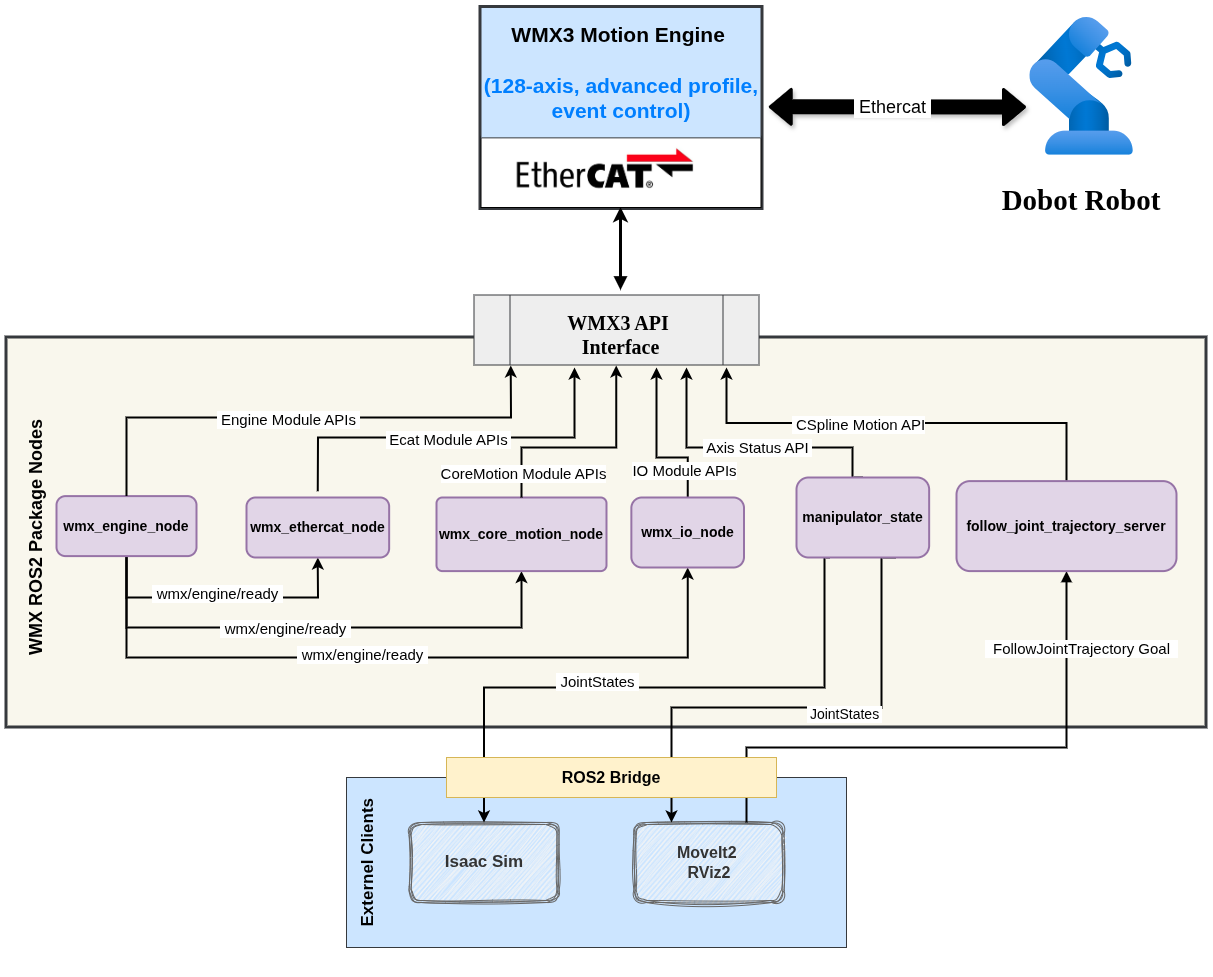
wmx_ros2_package — node graph#
manipulator_state#
The primary joint state publisher. Performs the full hardware initialization sequence (device creation, EtherCAT scan, communication start, parameter loading, servo enable) and then publishes encoder feedback at high frequency.
Source: src/manipulator_state.cpp
Class: ManipulatorState (inherits rclcpp::Node)
Node name: manipulator_state
Parameters#
Parameter |
Type |
Default |
Description |
|---|---|---|---|
|
|
|
Number of robot joints (typically 6) |
|
|
|
Encoder publish rate in Hz (typically 500) |
|
|
|
Joint position value when gripper is open |
|
|
|
Joint position value when gripper is closed |
|
|
|
Joint names for the JointState message |
|
|
(required) |
Topic name for primary joint state output |
|
|
(optional) |
Topic name for Isaac Sim joint command output |
|
|
(required) |
Topic name for Gazebo position controller output |
|
|
(required) |
Absolute path to the WMX axis parameter XML file |
Published Topics#
Topic |
Message Type |
Rate |
Description |
|---|---|---|---|
|
|
|
Joint positions + gripper state |
|
|
|
Mirror for Isaac Sim (no timestamp) |
|
|
|
Joint positions for Gazebo |
The JointState message contains joint_number joint positions from
encoder feedback plus 2 gripper finger positions derived from the EtherCAT
digital I/O bit (Io::GetOutBit(0, 0)).
Initialization Sequence#
        %%{init: {"theme": "base", "themeVariables": {"actorBkg": "#1a73e8", "actorTextColor": "#fff", "actorBorderColor": "#1558b0", "signalColor": "#555", "signalTextColor": "#1a1a1a", "noteBkgColor": "#fff3cd", "noteTextColor": "#856404"}}}%%
sequenceDiagram
    participant N as manipulator_state
    participant W as WMX API
    participant E as EtherCAT Bus
    participant S as Servo Drives (J1–J6)

    Note over N: Reads all ROS2 parameters<br/>(joint_number, feedback_rate, xml path …)

    loop Retry up to 5×, 2 s interval
        N->>W: CreateDevice("/opt/wmx3/")
        W-->>N: Device handle (or retry on failure)
    end

    N->>E: Ecat::ScanNetwork(masterId=0)
    E-->>N: 6 servo drives + I/O module discovered

    N->>W: StartCommunication(timeout=10 s)
    W-->>N: Real-time EtherCAT cycle active

    N->>W: config->ImportAndSetAll(xml_path)
    W-->>N: Gear ratios + polarities loaded

    loop For each joint  J1 → J6
        N->>S: ClearAmpAlarm(axis)
        S-->>N: Alarm cleared
        N->>S: SetServoOn(axis, enable=true)
        S-->>N: Servo enabled
    end

    Note over N: Publishing /joint_states @ 500 Hz
manipulator_state — startup sequence diagram#
Declare and read all ROS2 parameters
CreateDevice("/opt/wmx3/")with retry (5 attempts, 2s interval)Ecat::ScanNetwork(masterId=0)– EtherCAT device discoveryStartCommunication(timeout=10s)– begin real-time cycleconfig->ImportAndSetAll(wmx_param_file_path)– load axis parametersFor each joint:
ClearAmpAlarm()thenSetServoOn()Start encoder feedback timer
Shutdown Sequence#
Disable all servos (
SetServoOn(axis, 0)for each joint)Stop EtherCAT communication
Close WMX device
Wait 3 seconds for cleanup
follow_joint_trajectory_server#
Action server for executing MoveIt2-planned trajectories on the physical robot using WMX cubic spline interpolation.
Source: src/follow_joint_trajectory_server.cpp
Class: FollowJointTrajectoryServer (inherits rclcpp::Node)
Node name: follow_joint_trajectory_server
Parameters#
Parameter |
Type |
Default |
Description |
|---|---|---|---|
|
|
|
Number of robot joints |
|
|
(required) |
Action server name for FollowJointTrajectory |
|
|
(required) |
Service name for gripper open/close |
Action Server#
Action Name |
From |
Action Type |
|
The server processes trajectories as follows:
Validates point count (max 1000 points)
Adjusts timing (first point time = 0, removes points <1 ms apart)
Builds a WMX
CSplinePosDatastructure for all jointsExecutes via
AdvancedMotion::StartCSplinePos()Blocks on
AdvancedMotion::Wait()until completeReturns
error_code = 0on success, or WMX error code on failure
A spline buffer of 1000 points is allocated in the constructor via
AdvancedMotion::CreateSplineBuffer(0, 1000) and freed in the destructor.
Service Server#
Service Name |
From |
Service Type |
|
Controls the pneumatic gripper via Io::SetOutBit(0, 0, value).
true = close (bit=1), false = open (bit=0).
Initialization#
CreateDevice("/opt/wmx3/")with retry (5 attempts, 2s interval)Initialize CoreMotion and AdvancedMotion APIs
CreateSplineBuffer(0, 1000)– allocate trajectory bufferCreate action server and gripper service
wmx_engine_node#
Manages the WMX device lifecycle: creates the device, starts/stops EtherCAT communication, and publishes a ready signal to coordinate dependent nodes.
Source: src/wmx_engine_node.cpp
Node name: wmx_engine_node
On startup, the node automatically calls CreateDevice and
StartCommunication. It also exposes manual-override services for cases
where explicit control is needed.
Services#
Service |
Type |
Description |
|---|---|---|
|
|
Create or close the WMX device handle |
|
|
Start or stop EtherCAT communication |
|
|
Query engine state (Idle/Running/Communicating/Shutdown) |
|
|
Trigger EtherCAT network scan to discover slaves |
Published Topics#
Topic |
Message Type |
Description |
|---|---|---|
|
|
|
wmx_core_motion_node#
Provides service-based axis control and topic-based motion commands.
Waits for /wmx/engine/ready before activating.
Source: src/wmx_core_motion_node.cpp
Node name: wmx_core_motion_node
Services#
Service |
Type |
Description |
|---|---|---|
|
|
Enable/disable servo drives |
|
|
Clear amplifier faults |
|
|
Set position (0) or velocity (1) mode |
|
|
Set rotation direction (1 or -1) |
|
|
Configure encoder gear ratio |
|
|
Set current position as home (zero) |
Published Topics#
Topic |
Message Type |
Rate |
Description |
|---|---|---|---|
|
|
100 Hz |
Full per-axis status (servo state, alarms, positions, velocities) |
Subscribed Topics#
Topic |
Message Type |
Description |
|---|---|---|
|
|
Velocity commands → |
|
|
Absolute position → |
|
|
Relative position → |
wmx_io_node#
Provides service-based access to EtherCAT digital I/O.
Waits for /wmx/engine/ready before activating.
Source: src/wmx_io_node.cpp
Node name: wmx_io_node
Services#
Service |
Type |
Description |
|---|---|---|
|
|
Read a single digital input bit |
|
|
Read back a digital output bit |
|
|
Read a block of digital input bytes |
|
|
Read a block of digital output bytes |
|
|
Write a single digital output bit |
|
|
Write a block of digital output bytes |
wmx_ethercat_node#
Provides EtherCAT diagnostic services for network monitoring and debugging.
Waits for /wmx/engine/ready before activating.
Source: src/wmx_ethercat_node.cpp
Node name: wmx_ethercat_node
Services#
Service |
Type |
Description |
|---|---|---|
|
|
Full network state: master + all slaves |
|
|
Read raw EtherCAT register from a slave |
|
|
Reset packet loss / timing counters |
|
|
Initiate hot-connect for dynamic slave addition |
diff_drive_controller (Disabled)#
Differential drive controller for mobile base applications. Converts
geometry_msgs/Twist commands into individual wheel velocity commands via
the WMX engine.
Note
This node is commented out in CMakeLists.txt and is not built
by default. It is documented here for reference.
Source: src/diff_drive_controller.cpp
Class: DiffDriveController (inherits rclcpp::Node)
Node name: diff_drive_controller
Parameters#
Parameter |
Type |
Default |
Description |
|---|---|---|---|
|
|
|
WMX axis index for left wheel |
|
|
|
WMX axis index for right wheel |
|
|
|
Control loop rate in Hz |
|
|
|
Acceleration time (seconds) |
|
|
|
Deceleration time (seconds) |
|
|
|
Wheel radius in meters |
|
|
|
Distance between wheels in meters |
|
|
(required) |
Input velocity command topic |
|
|
(required) |
Output velocity echo topic |
|
|
(required) |
Output wheel angular velocity topic |
|
|
(required) |
Output odometry topic |
|
|
(required) |
Path to WMX parameter XML file |
Subscribed Topics#
Topic |
Message Type |
Description |
|---|---|---|
|
|
Linear/angular velocity commands |
Published Topics#
Topic |
Message Type |
Description |
|---|---|---|
|
|
Echo of received cmd_vel |
|
|
Wheel angular velocities |
|
|
Encoder-based odometry |
Timers#
Three timers run at the configured rate (Hz):
cmdVelStep()– ConvertTwistto wheel velocities and send to WMX. Includes safety checks: verifies engine is communicating, no amplifier alarms, and servos are enabled before sending commands.encoderOmegaStep()– Read actual wheel velocities from WMX and publish asFloat64MultiArrayencoderOdometryStep()– Compute and publish odometry from wheel encoder feedback
Launch Files#
wmx_ros2_multi_node.launch.py#
Starts the four WMX service nodes for standalone axis control without MoveIt2 integration.
Nodes launched:
wmx_engine_nodewmx_core_motion_nodewmx_io_nodewmx_ethercat_node
Arguments: use_sim_time (default: false)
Config loaded: None (nodes use default parameters)
sudo --preserve-env=PATH \
     --preserve-env=AMENT_PREFIX_PATH \
     --preserve-env=COLCON_PREFIX_PATH \
     --preserve-env=PYTHONPATH \
     --preserve-env=LD_LIBRARY_PATH \
     --preserve-env=ROS_DISTRO \
     --preserve-env=ROS_VERSION \
     --preserve-env=ROS_PYTHON_VERSION \
     --preserve-env=ROS_DOMAIN_ID \
     --preserve-env=RMW_IMPLEMENTATION \
     bash -c "source /opt/ros/\${ROS_DISTRO}/setup.bash && \
              source ~/wmx_ros2_ws/install/setup.bash && \
              ros2 launch wmx_ros2_package wmx_ros2_multi_node.launch.py"
wmx_ros2_intel_manipulator_cr3a.launch.py#
Full manipulator launch for Intel x86_64 platforms.
Nodes launched:
manipulator_statefollow_joint_trajectory_serverwmx_engine_nodewmx_core_motion_nodewmx_io_node
Arguments:
Argument |
Default |
Description |
|---|---|---|
|
|
Use simulated clock source |
Config loaded: config/intel_manipulator_config_cr3a.yaml
All three nodes receive parameters from the same YAML file plus the
use_sim_time argument.
sudo --preserve-env=PATH \
     --preserve-env=AMENT_PREFIX_PATH \
     --preserve-env=COLCON_PREFIX_PATH \
     --preserve-env=PYTHONPATH \
     --preserve-env=LD_LIBRARY_PATH \
     --preserve-env=ROS_DISTRO \
     --preserve-env=ROS_VERSION \
     --preserve-env=ROS_PYTHON_VERSION \
     --preserve-env=ROS_DOMAIN_ID \
     --preserve-env=RMW_IMPLEMENTATION \
     bash -c "source /opt/ros/\${ROS_DISTRO}/setup.bash && \
              source ~/wmx_ros2_ws/install/setup.bash && \
              ros2 launch wmx_ros2_package \
                wmx_ros2_intel_manipulator_cr3a.launch.py \
                use_sim_time:=false"
wmx_ros2_orin_manipulator_cr3a.launch.py#
Full manipulator launch for NVIDIA Jetson Orin platforms.
Nodes launched:
manipulator_statefollow_joint_trajectory_serverwmx_engine_nodewmx_core_motion_nodewmx_io_node
Arguments:
Argument |
Default |
Description |
|---|---|---|
|
|
Use simulated clock source |
Config loaded: config/orin_manipulator_config_cr3a.yaml
sudo --preserve-env=PATH \
     --preserve-env=AMENT_PREFIX_PATH \
     --preserve-env=COLCON_PREFIX_PATH \
     --preserve-env=PYTHONPATH \
     --preserve-env=LD_LIBRARY_PATH \
     --preserve-env=ROS_DISTRO \
     --preserve-env=ROS_VERSION \
     --preserve-env=ROS_PYTHON_VERSION \
     --preserve-env=ROS_DOMAIN_ID \
     --preserve-env=RMW_IMPLEMENTATION \
     bash -c "source /opt/ros/\${ROS_DISTRO}/setup.bash && \
              source ~/wmx_ros2_ws/install/setup.bash && \
              ros2 launch wmx_ros2_package \
                wmx_ros2_orin_manipulator_cr3a.launch.py \
                use_sim_time:=false"
wmx_ros2_diff_drive_controller.launch.py#
Note
The diff_drive_controller executable is commented out in
CMakeLists.txt. This launch file will fail unless the build
is modified to include it.
Nodes launched: diff_drive_controller
Arguments: None
Config loaded: config/diff_drive_controller_config.yaml
sudo --preserve-env=PATH \
     --preserve-env=AMENT_PREFIX_PATH \
     --preserve-env=COLCON_PREFIX_PATH \
     --preserve-env=PYTHONPATH \
     --preserve-env=LD_LIBRARY_PATH \
     --preserve-env=ROS_DISTRO \
     --preserve-env=ROS_VERSION \
     --preserve-env=ROS_PYTHON_VERSION \
     --preserve-env=ROS_DOMAIN_ID \
     --preserve-env=RMW_IMPLEMENTATION \
     bash -c "source /opt/ros/\${ROS_DISTRO}/setup.bash && \
              source ~/wmx_ros2_ws/install/setup.bash && \
              ros2 launch wmx_ros2_package \
                wmx_ros2_diff_drive_controller.launch.py"
Configuration Files#
intel_manipulator_config_cr3a.yaml#
Parameters for the Intel x86_64 manipulator deployment.
manipulator_state:
  ros__parameters:
    joint_number: 6
    joint_feedback_rate: 500
    gripper_open_value: 0.00
    gripper_close_value: 0.045
    joint_name: ["joint1", "joint2", "joint3", "joint4", "joint5", "joint6",
                  "picker_1_joint", "picker_2_joint"]
    encoder_joint_topic: /joint_states
    gazebo_joint_topic: /gazebo_position_controller/commands
    wmx_param_file_path: /home/<user>/wmx_ros2_ws/src/wmx_ros2_application/
                         wmx_ros2_package/config/cr3a_wmx_parameters.xml

follow_joint_trajectory_server:
  ros__parameters:
    joint_number: 6
    wmx_gripper_topic: /wmx/set_gripper
    joint_trajectory_action: /movensys_manipulator_arm_controller/
                             follow_joint_trajectory
Important
Update wmx_param_file_path to match your actual home directory.
The default references the machine username mvsk.
orin_manipulator_config_cr3a.yaml#
Parameters for the NVIDIA Jetson Orin manipulator deployment. Identical to the Intel config with two differences:
Adds
isaacsim_joint_topic: /isaacsim/joint_commandfor Isaac Sim integrationThe
wmx_param_file_pathreferences the Orin machine path (usernamemic-733ao)
manipulator_state:
  ros__parameters:
    joint_number: 6
    joint_feedback_rate: 500
    gripper_open_value: 0.00
    gripper_close_value: 0.045
    joint_name: ["joint1", "joint2", "joint3", "joint4", "joint5", "joint6",
                  "picker_1_joint", "picker_2_joint"]
    encoder_joint_topic: /joint_states
    isaacsim_joint_topic: /isaacsim/joint_command
    wmx_param_file_path: /home/<user>/wmx_ros2_ws/src/wmx_ros2_application/
                         wmx_ros2_package/config/cr3a_wmx_parameters.xml

follow_joint_trajectory_server:
  ros__parameters:
    joint_number: 6
    wmx_gripper_topic: /wmx/set_gripper
    joint_trajectory_action: /movensys_manipulator_arm_controller/
                             follow_joint_trajectory
diff_drive_controller_config.yaml#
Parameters for the differential drive mobile base controller.
diff_drive_controller:
  ros__parameters:
    left_axis: 0
    right_axis: 1
    rate: 100
    acc_time: 1.0
    dec_time: 1.0
    wheel_radius: 0.09
    wheel_to_wheel: 0.55
    cmd_vel_topic: /cmd_vel
    encoder_vel_topic: /cmd_vel_check
    encoder_omega_topic: /velocity_controller/commands
    encoder_odometry_topic: /odom_enc
    wmx_param_file_path: /home/<user>/wmx_ros2_ws/src/wmx_ros2_application/
                         wmx_ros2_package/config/baymax_wmx_parameters.xml
WMX Parameter XML Files#
Two robot-specific WMX parameter files define per-axis motor configuration:
cr3a_wmx_parameters.xml– Parameters for the Dobot CR3A manipulator (gear ratios, polarities, limits, home positions for 6 joints)baymax_wmx_parameters.xml– Parameters for the Baymax mobile base (gear ratios, limits for 2 wheel axes)
These files are loaded at runtime by the manipulator_state node via
CoreMotion::config->ImportAndSetAll(path).
Building the Package#
This package depends on wmx_ros2_message and must be built after it:
cd ~/wmx_ros2_ws

# Stage 1: Build message package
colcon build --packages-select wmx_ros2_message
source install/setup.bash

# Stage 2: Build application package
colcon build --packages-select wmx_ros2_package
source install/setup.bash
Verify executables are available:
ros2 pkg executables wmx_ros2_package
Expected:
wmx_ros2_package diff_drive_controller
wmx_ros2_package follow_joint_trajectory_server
wmx_ros2_package manipulator_state
wmx_ros2_package wmx_core_motion_node
wmx_ros2_package wmx_engine_node
wmx_ros2_package wmx_ethercat_node
wmx_ros2_package wmx_io_node