
Isaac Sim Manipulator#
Overview#
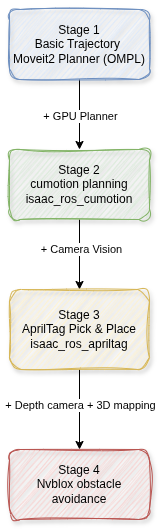
The movensys_thor_manipulator workspace is a standalone ROS 2 Humble application that integrates NVIDIA Isaac ROS with MoveIt2 for GPU-accelerated manipulator control. It provides a progressive 4-stage workflow that takes the Dobot CR3A from basic trajectory validation through vision-guided pick-and-place with real-time obstacle avoidance.
The workspace is located at:
~/manipulator_ros_ws/src/movensys_thor_manipulator/
Stage |
Capability |
Description |
Key NVIDIA Component |
|---|---|---|---|
1 |
Basic Trajectory |
Cartesian/joint motion with MoveIt2 OMPL planner |
None (baseline) |
2 |
cuMotion Planning |
GPU-accelerated motion planning replaces OMPL |
|
3 |
AprilTag Pick & Place |
Vision-based detection and autonomous manipulation |
|
4 |
NvBlox Obstacle Avoidance |
3D volumetric mapping for collision-free planning |
|
The diagram below shows the four stages and how each one builds on the previous:
Each stage can run in three environments:
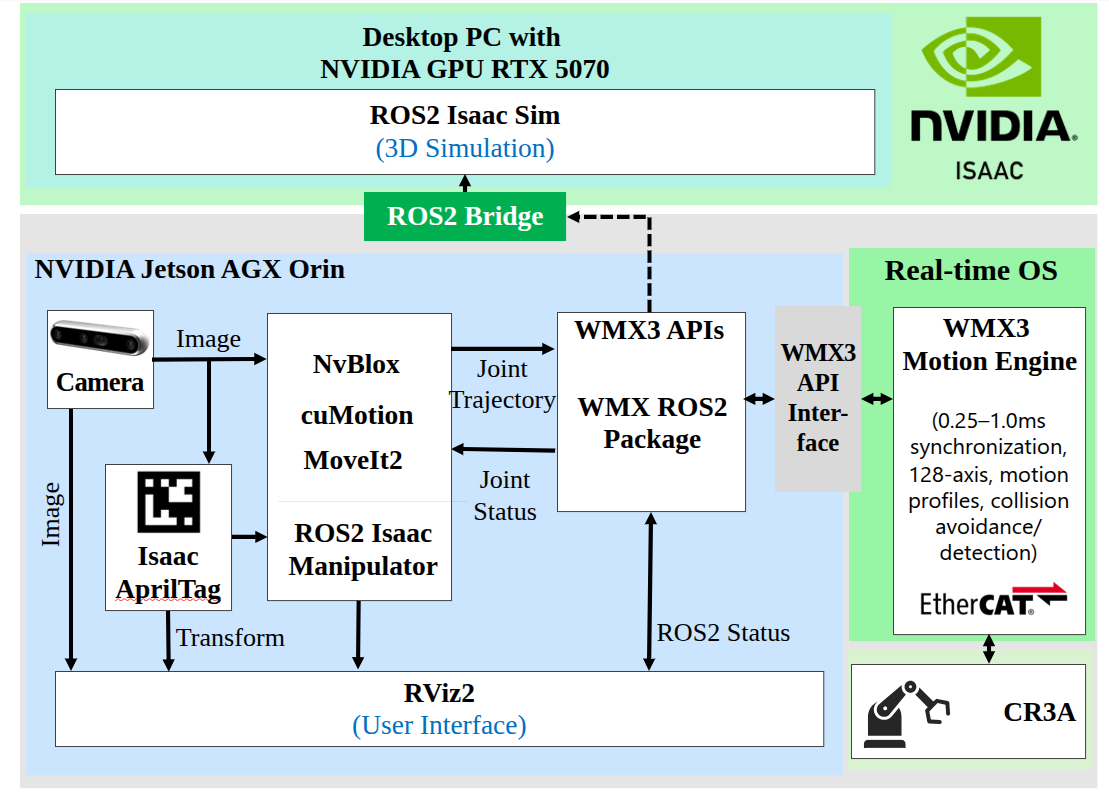
Simulation – Isaac Sim provides both the physics engine and sensor simulation. The
simulation_actionbridge node forwards trajectories from MoveIt2 to Isaac Sim via the/joint_commandtopic.Hardware-in-the-Loop (HiL) – Isaac Sim acts as a digital twin while the real robot is driven by WMX ROS2 over EtherCAT. Both systems share the same
/joint_statestopic.Real Robot – No simulator. WMX ROS2 drives the physical robot directly and MoveIt2/cuMotion plans in real time.
Architecture#
Packages#
The workspace contains three ROS 2 packages:
Package |
Purpose |
|---|---|
|
URDF/Xacro robot model for the Dobot CR3A with table, stand, bracket, gripper, and picker links. Provides STL mesh assets and RViz launch files. |
|
MoveIt2 configuration: SRDF (planning group |
|
Scenario executables, launch files, NVIDIA Isaac ROS integration configs,
camera configs, and the |
Kinematic Chain#
world_manipulator -> table -> stand -> Link0
  -> joint1 (revolute) -> Link1
    -> joint2 (revolute) -> Link2
      -> joint3 (revolute) -> Link3
        -> joint4 (revolute) -> Link4
          -> joint5 (revolute) -> Link5
            -> joint6 (revolute) -> Link6
              -> bracket (fixed) -> gripper (fixed)
                -> picker_1_joint (prismatic) -> picker_1
                -> picker_2_joint (prismatic) -> picker_2
The arm group movensys_manipulator_arm is defined as the chain from
Link0 to Link6 (6 revolute joints). The end-effector group
movensys_manipulator_eef includes the bracket and gripper links.
The gripper has two prismatic picker joints with a range of 0–0.045 m.
Source Files#
MoveIt2 Client Library (src/moveit2_client.cpp, include/moveit2_client.hpp)
A reusable C++ class wrapping MoveGroupInterface that provides:
jointMovement()– Plan and execute to a joint-space targetabsoluteBaseEefCartesian()– Cartesian path in base frame usingcomputeCartesianPath()withTimeOptimalTrajectoryGenerationabsoluteBaseEefJointMovement()– IK pose target withsetPoseTarget()relativeBaseEefCartesian()– Relative Cartesian move in base framerelativeToolEefCartesian()– Relative Cartesian move in tool frame (applies delta in end-effector coordinate system)setGripper()– Calls/wmx/set_gripperservice (std_srvs/SetBool)lookupTF()– Cached TF lookup via/tfsubscriptiongetCurrentEefPose()– Current end-effector pose from MoveIt state
Configurable parameters set per-scenario: vel_scale, acc_scale,
delay_exec, delay_gripper, max_step, planning_time,
jump_threshold, timeout, planning_attempts, replan,
replan_attempts.
Simulation Bridge (src/simulation_action.cpp)
The simulation_action node bridges MoveIt2 and Isaac Sim in simulation mode:
Creates a
FollowJointTrajectoryaction server at/movensys_manipulator_arm_controller/follow_joint_trajectorySubscribes to
/joint_states(published by Isaac Sim)Publishes each trajectory point to
/joint_command(consumed by Isaac Sim) with the actual inter-point time delayProvides
/wmx/set_gripperservice – sets gripper position to0.045(closed) or0.000(open) and publishes updated joint commandTrajectory points are padded from 6 to 8 values (appending gripper state for
picker_1_jointandpicker_2_joint)
Scenario Executables:
stage1and2_trajectory_cpp(src/stage1and2_trajectory.cpp) – Demonstrates absolute/relative Cartesian, joint movement, and gripper control withvel_scale=0.3,acc_scale=0.3stage3_apriltag_cpp(src/stage3_apriltag.cpp) – AprilTag-guided pick-and-place for 4 colored objects (green, blue, grey, red) usingtag36h11family markers. Uses visual servoing loop to converge on tag within tolerance (30 mm position, 50 mrad orientation). Runs atvel_scale=1.0,acc_scale=1.0stage4_nvblox_cpp(src/stage4_nvblox.cpp) – Moves between two poses with obstacle-aware planning via cuMotion + NvBlox ESDF
Prerequisites#
Hardware#
NVIDIA GPU with CUDA support (RTX 5070/5090 tested for desktop, Jetson Orin for embedded)
Stage 4 is recommended to run on a GPU with 16 GB or more
Intel RealSense depth camera (for Stage 3 real robot and Stage 4)
Dobot CR3A manipulator with WMX EtherCAT drives (for HiL/Real modes)
Software#
Ubuntu 22.04.5 LTS (Jammy)
ROS 2 Humble
NVIDIA Driver (570-open for RTX 5070, 580-open for RTX 5090)
Docker with NVIDIA Container Toolkit
Git LFS
Isaac Sim 5.0.0
Isaac ROS release-3.2 repositories (cloned by
setup.sh)CycloneDDS middleware (
rmw_cyclonedds_cpp)3D USD assets from
robotics_isaac_simrepository
For HiL and Real Robot modes, the core WMX ROS2 packages must be built and the WMX Runtime (LMX) installed (see Getting Started).
Installation#
Step 1: Environment Variables#
Add to ~/.bashrc:
export ROS_DOMAIN_ID=70
export HOST_USER_UID=1000        # replace with: id -u
export HOST_USER_GID=1000        # replace with: id -g

export RMW_IMPLEMENTATION=rmw_cyclonedds_cpp

export ISAAC_ROS_WS=~/workspaces/isaac_ros-dev
export MANIPULATOR_ROS_WS=~/workspaces/movensys_manipulator_ws

source /opt/ros/humble/setup.bash
source ~/workspaces/movensys_manipulator_ws/install/setup.bash
Then reload:
source ~/.bashrc
Step 2: Clone Repository#
mkdir -p ${MANIPULATOR_ROS_WS}/src
cd ${MANIPULATOR_ROS_WS}/src
git clone https://github.com/movensys/movensys_thor_manipulator.git
Step 3: Run Setup Script#
The setup.sh script performs the following:
Configures CycloneDDS network buffer sizes (26 MB for rmem/wmem)
Installs ROS 2 dependencies (MoveIt2, ros2_control, CycloneDDS, etc.)
Clones Isaac ROS repositories (
isaac_ros_common,isaac_manipulator,isaac_ros_nvblox,ros2_robotiq_gripper,serial) into${ISAAC_ROS_WS}/src/Downloads NGC assets for AprilTag and NvBlox
Configures RealSense support in Isaac ROS common
Patches
isaac_manipulator_pick_and_placewith revised launch/CMake filesLaunches the Isaac ROS development container via
run_dev.sh
cd ${MANIPULATOR_ROS_WS}/src/movensys_thor_manipulator
sudo chmod +x setup.sh
./setup.sh
Step 4: Build Docker Container#
Two Docker Compose files are provided:
File |
Base Image |
Platform |
|---|---|---|
|
|
Desktop GPU (RTX series) |
|
|
NVIDIA Jetson / MIC-713 / MIC-733ao |
For Desktop:
cd ${MANIPULATOR_ROS_WS}/src/movensys_thor_manipulator/docker
docker compose -f manipulator_desktop.yaml build
docker compose -f manipulator_desktop.yaml up -d
For MIC / Jetson:
cd ${MANIPULATOR_ROS_WS}/src/movensys_thor_manipulator/docker
docker compose -f manipulator_mic.yaml build
docker compose -f manipulator_mic.yaml up -d
The container startup command automatically builds all Isaac ROS packages and
the movensys_manipulator packages inside the container. Monitor the build:
docker logs -f movensys_thor_manipulator_container
Wait for ====== Build Terminated ======= to appear.
Step 5: Build Host Workspace#
cd ${MANIPULATOR_ROS_WS}
colcon build
source ~/.bashrc
Step 6: Download 3D Assets#
Clone the Isaac Sim USD files:
git clone https://github.com/movensys/robotics_isaac_sim.git
Configuration#
MoveIt2 Configuration#
Controller (movensys_manipulator_moveit_config/config/moveit_controllers.yaml):
The MoveIt controller manager is configured with a single
FollowJointTrajectory controller named
movensys_manipulator_arm_controller controlling joints 1–6:
moveit_controller_manager: moveit_simple_controller_manager/MoveItSimpleControllerManager

moveit_simple_controller_manager:
  controller_names:
    - movensys_manipulator_arm_controller

  movensys_manipulator_arm_controller:
    action_ns: follow_joint_trajectory
    type: FollowJointTrajectory
    default: true
    joints:
      - joint1
      - joint2
      - joint3
      - joint4
      - joint5
      - joint6
Joint Limits (movensys_manipulator_moveit_config/config/joint_limits.yaml):
All 6 joints: max_velocity: 3.0 rad/s, max_acceleration: 3.0 rad/s2.
Kinematics (movensys_manipulator_moveit_config/config/kinematics.yaml):
movensys_manipulator_arm:
  kinematics_solver: kdl_kinematics_plugin/KDLKinematicsPlugin
  kinematics_solver_search_resolution: 0.005
  kinematics_solver_timeout: 0.1
Planning Pipelines: OMPL, CHOMP, and Pilz Industrial Motion Planner are
configured as available planners. In Stage 2+, isaac_ros_cumotion is
injected as the default planning pipeline.
cuMotion Configuration#
XRDF (movensys_manipulator_description/urdf/movensys_manipulator.xrdf):
The Extended Robot Description Format file defines cuMotion-specific parameters:
base_link:Link0tool_frames:["Link6"]cspace.joint_names:["joint1"..."joint6"]cspace.velocity_limits:[3.0, 3.0, 3.0, 3.0, 3.0, 3.0]cspace.acceleration_limits:[3.0, 3.0, 3.0, 3.0, 3.0, 3.0]cspace.jerk_limits:[50, 50, 50, 50, 50, 50]cspace.retract_config:[1.57, 0.0, 1.57, 0.0, -1.57, 0.0]Collision geometry: auto-generated spheres for all links with self-collision ignore rules for adjacent/skip-one link pairs
buffer_distance: 0.0 m for world collision, 0.002 m for self-collision
cuMotion Planning Plugin
(movensys_manipulator_isaac_config/config/isaac_ros_cumotion_planning.yaml):
planning_plugin: isaac_ros_cumotion_moveit/CumotionPlanner
request_adapters: >-
  default_planner_request_adapters/FixWorkspaceBounds
  default_planner_request_adapters/FixStartStateBounds
  default_planner_request_adapters/FixStartStateCollision
  default_planner_request_adapters/FixStartStatePathConstraints
start_state_max_bounds_error: 0.1
num_steps: 32
NvBlox Configuration#
Base Config (movensys_manipulator_isaac_config/config/nvblox_movensys_base.yaml):
voxel_size: 0.01 mglobal_frame/pose_frame:world_manipulatoresdf_mode:3d(for manipulation)integrate_depth_rate_hz: 40.0update_esdf_rate_hz: 10.0
Workspace Bounds (movensys_manipulator_isaac_config/config/movensys_sim.yaml):
static_mapper:
  workspace_bounds_type: "bounding_box"
  workspace_bounds_min_corner_x_m: -0.5
  workspace_bounds_min_corner_y_m: -0.4
  workspace_bounds_min_height_m: 0.0
  workspace_bounds_max_corner_x_m: 0.5
  workspace_bounds_max_corner_y_m: 0.4
  workspace_bounds_max_height_m: 0.7
Robot Segmenter
(movensys_manipulator_isaac_config/config/robot_segmenter_movensys.yaml):
Filters robot pixels from depth images before feeding to NvBlox:
Input:
/image_nvblox/depth,/image_nvblox/camera_infoOutput:
/robot_segmenter/world_depth(robot-free depth)distance_threshold: 0.15 m from collision spheres
Camera Configuration#
Two Intel RealSense camera configs are provided:
config/realsense_mono.yaml– RGB-only at 640x480@15fps for hand camera (Stage 3 AprilTag detection), remapped to/image_hand/rgbconfig/realsense_mono_depth.yaml– RGB + depth at 640x480@15fps for NvBlox camera (Stage 4), remapped to/image_nvblox/rgband/image_nvblox/depth
CycloneDDS Configuration#
docker/cyclonedds.xml configures:
MaxMessageSize: 65500 bytesSocketReceiveBufferSize: 10 MB minimumSocketSendBufferSize: 2 MB minimumMaxAutoParticipantIndex: 120
Docker Environment#
Key environment variables in the Docker container (.env):
RMW_IMPLEMENTATION:rmw_cyclonedds_cppCYCLONEDDS_URI:file:///home/admin/cyclonedds.xmlCONTAINER_NAME:movensys_thor_manipulator_container
Isaac Sim USD Files#
USD File |
Environment |
Target Stages |
|---|---|---|
|
Simulation |
Stages 1–3 |
|
Hardware-in-the-Loop |
Stages 1–3 |
|
Real-Robot Demo |
Stages 1–3 |
|
Simulation |
Stage 4 |
Usage#
Entering the Docker Container#
All Isaac ROS components (cuMotion, AprilTag, NvBlox) run inside the Docker container. Enter it with:
docker exec -u admin -it movensys_thor_manipulator_container \
  bash -lc 'source /opt/ros/humble/setup.bash && \
            source /home/admin/ws/install/setup.bash && \
            source /workspaces/isaac_ros-dev/install/setup.bash && \
            exec bash -i'
Stage 1: Basic Trajectory (Simulation)#
Open Isaac Sim and load
~/robotics_isaac_sim/isaac_manipulator/simulation_1_to_3.usd, then press Play.Terminal 1 (host) – Launch the simulation bridge:
ros2 run movensys_manipulator_isaac_config simulation_action \
  --ros-args -p use_sim_time:=true
Terminal 2 (host) – Launch MoveIt2:
ros2 launch movensys_manipulator_moveit_config \
  movensys_manipulator_moveit.launch.py use_sim_time:=true
Terminal 3 (host) – Execute trajectory test:
ros2 launch movensys_manipulator_isaac_config \
  stage1and2_trajectory.launch.py use_sim_time:=true
The script executes: absolute Cartesian moves, relative base-frame moves, relative tool-frame moves, joint-space moves, and gripper open/close.
Stage 2: cuMotion GPU Planning (Simulation)#
Open Isaac Sim with
simulation_1_to_3.usdand press Play.Terminal 1 (host) – Launch simulation bridge:
ros2 run movensys_manipulator_isaac_config simulation_action \
  --ros-args -p use_sim_time:=true
Terminal 2 (container) – Launch cuMotion + MoveIt2:
ros2 launch movensys_manipulator_isaac_config \
  isaac_cumotion.launch.py use_sim_time:=true
This launch file dynamically patches the MoveIt2 launch to inject
isaac_ros_cumotionas the default planning pipeline, then starts thecumotion_planner_nodewith the XRDF and URDF files.Terminal 3 (host) – Execute trajectory test:
ros2 launch movensys_manipulator_isaac_config \
  stage1and2_trajectory.launch.py use_sim_time:=true
Stage 3: AprilTag Pick & Place (Simulation)#
Open Isaac Sim with
simulation_1_to_3.usdand press Play.Terminal 1 (host) – Launch simulation bridge:
ros2 run movensys_manipulator_isaac_config simulation_action \
  --ros-args -p use_sim_time:=true
Terminal 2 (container) – Launch AprilTag + cuMotion:
ros2 launch movensys_manipulator_isaac_config \
  isaac_apriltag.launch.py use_sim_time:=true
This launches the
isaac_ros_apriltagcomposable node (subscribed to/image_hand/rgband/image_hand/camera_info, tag size 0.05 m,tag36h11family) together with the cuMotion planner.Terminal 3 (host) – Execute pick-and-place:
ros2 launch movensys_manipulator_isaac_config \
  stage3_apriltag.launch.py use_sim_time:=true target_spawn:=false
The workflow for each of the 4 objects (tags
5,9,7,11):Move to scan position
Visual servo loop: read AprilTag TF, move relative to tool frame, repeat until position error < 30 mm and orientation error < 50 mrad
Apply tag-to-target offset (
x=+0.01,y=-0.065)Move down 0.21 m, close gripper
Move up, travel to box position, move down, open gripper
Stage 4: NvBlox Obstacle Avoidance (Simulation)#
Open Isaac Sim with
simulation_4.usdand press Play.Terminal 1 (host) – Launch simulation bridge:
ros2 run movensys_manipulator_isaac_config simulation_action \
  --ros-args -p use_sim_time:=true
Terminal 2 (host) – Launch camera transform:
ros2 launch movensys_manipulator_isaac_config \
  camera_nvblox_transform.launch.py simulation:=true
This publishes a static TF from
world_manipulatortocamera_nvblox_color_optical_frame(simulation) orcamera_nvblox_link(real).Terminal 3 (container) – Launch cuMotion + NvBlox:
ros2 launch movensys_manipulator_isaac_config \
  isaac_cumotion_nvblox.launch.py use_sim_time:=true
This launches:
MoveIt2 with cuMotion as default planner
manipulation_containerwith NvBlox composable node (3D ESDF mode)robot_segmenter_node– filters robot from depth imagescumotion_planner_nodewithread_esdf_world: Truefor obstacle-aware planning via/nvblox_node/get_esdf_and_gradientservice
Note
On RTX 5000-series GPUs, PyTorch requires CUDA 12.8+ but the Docker container uses CUDA 12.6. A one-time JIT compilation (~3 minutes) occurs on first run. Compiled files are cached for subsequent runs.
Terminal 4 (host) – Execute obstacle-avoidance demo:
ros2 launch movensys_manipulator_isaac_config \
  stage4_nvblox.launch.py use_sim_time:=true
The demo moves the arm between two poses (
x=-0.35andx=+0.35) while cuMotion plans around detected obstacles.
Hardware-in-the-Loop Mode#
In HiL mode, the WMX ROS2 stack drives the physical robot while Isaac Sim mirrors the motion:
Open Isaac Sim with
hil_1_to_3.usdand press Play.Launch the WMX ROS2 manipulator stack on the IPC (see Getting Started).
IPC – Launch MoveIt2:
ros2 launch movensys_manipulator_moveit_config \
  movensys_manipulator_moveit.launch.py
IPC – Execute scenario:
ros2 launch movensys_manipulator_isaac_config \
  stage1and2_trajectory.launch.py
Note:
use_sim_timeis not set (defaults tofalse) andsimulation_actionis not launched. The WMX ROS2follow_joint_trajectory_serverhandles the action.
Utility Tools#
URDF Visualization:
ros2 launch movensys_manipulator_description movensys_manipulator_rviz.launch.py
Joint GUI with Isaac Sim sync:
ros2 launch movensys_manipulator_description movensys_manipulator_isaac_gui.launch.py
This publishes joint_state_publisher_gui output to /joint_command
(remapped from /joint_states) for direct Isaac Sim joint control.
Camera Transform Tuning:
ros2 launch movensys_manipulator_isaac_config \
  camera_transform_tuning.launch.py use_sim_time:=true
A Tkinter GUI (scripts/camera_transform_tuning.py) with interactive
sliders for tuning the world_manipulator to camera static transform.
Publishes to /tf_static in real time with configurable step sizes for
position (meters) and rotation (radians).
How It Connects to WMX ROS2#
The Isaac manipulator workspace is designed to work alongside the core WMX ROS2
packages (Packages). The connection point is the
FollowJointTrajectory action interface and the /joint_states topic.
Component |
Simulation Mode |
HiL / Real Mode |
|---|---|---|
Action server |
|
WMX ROS2 |
Action name |
|
|
Joint state source |
Isaac Sim ( |
WMX ROS2 encoder feedback ( |
Trajectory execution |
Per-point publish with time delay to |
WMX cubic spline interpolation via EtherCAT |
Gripper service |
|
WMX ROS2 |
Simulator feedback |
Isaac Sim is the physics engine |
Isaac Sim mirrors via |
Switching between modes requires no code changes to the scenario
executables (stage1and2_trajectory_cpp, stage3_apriltag_cpp, etc.).
The only differences are:
Which action server is running (
simulation_actionvs WMX ROS2)Whether
use_sim_timeis setWhich Isaac Sim USD file is loaded
The MoveIt2 controller configuration
(movensys_manipulator_arm_controller) uses the same action namespace
in both modes, so MoveIt2 sends trajectories to whichever action server
is active.
For building custom applications that use both workspaces, see Building Custom Applications.