
Ctrl+K

WMX ROS2 Documentation

  • GitHub
  • GitHub

Table of Contents

Contents

  • Getting Started
    • System Requirements
      • WMX Motion Control Engine
      • Operating System
      • ROS2 Distribution
      • Hardware Requirements
      • Supported Models & Platforms
    • Install ROS2
      • ROS2 Humble (Ubuntu 22.04)
      • ROS2 Jazzy (Ubuntu 24.04)
      • Verify ROS2
    • Install Dependencies
      • Verify LMX(WMX Runtime) Installation
    • Create Workspace and Build
    • Configure Environment
      • Verify Installation
    • Testing in Simulation
      • Test the General Node (Standalone)
      • Publish Simulated Joint States
      • Simulation Environments
    • Testing with Real Robot
      • Prerequisites
      • EtherCAT Wiring
      • Configuration
      • Launch Commands
      • Startup Sequence
      • Verifying the Connection
      • Gripper Control
      • Shutdown
    • Communication Overview
  • Packages
    • wmx_ros2_message
      • Overview
      • Package Structure
      • Dependencies
      • Message Definitions
        • AxisPose
        • AxisVelocity
        • AxisState
      • Service Definitions
        • SetEngine
        • SetAxis
        • SetAxisGearRatio
      • Building the Package
    • wmx_ros2_package
      • Overview
      • Package Structure
      • Dependencies
        • Package Dependencies (package.xml)
        • CMake Dependencies (find_package)
        • WMX Libraries (External)
      • Nodes
        • manipulator_state
        • follow_joint_trajectory_server
        • wmx_engine_node
        • wmx_core_motion_node
        • wmx_io_node
        • wmx_ethercat_node
        • diff_drive_controller (Disabled)
      • Launch Files
        • wmx_ros2_multi_node.launch.py
        • wmx_ros2_intel_manipulator_cr3a.launch.py
        • wmx_ros2_orin_manipulator_cr3a.launch.py
        • wmx_ros2_diff_drive_controller.launch.py
      • Configuration Files
        • intel_manipulator_config_cr3a.yaml
        • orin_manipulator_config_cr3a.yaml
        • diff_drive_controller_config.yaml
        • WMX Parameter XML Files
      • Building the Package
  • Integration Scenarios
    • MoveIt2 Motion Planning
      • Overview
      • Architecture
      • Prerequisites
      • Configuration
      • Usage
      • Trajectory Execution Details
    • Isaac cuMotion Accelerated Planning
      • Overview
      • Prerequisites
      • Integration
      • Stage 2a – Simulation
      • Stage 2b – Hardware-in-the-Loop (HiL)
      • Stage 2c – Real Robot (No Simulation)
      • See Also
    • Custom Planner Integration
      • Overview
      • Replacing the Default Planner
      • Interface Requirements
      • Constraints and Limitations
      • Python Example: Custom Trajectory Generator
      • Standalone Axis Control
      • See Also
    • Building Custom Applications
      • Overview
      • Prerequisites
      • Available Interfaces
      • Python Example: Send a Trajectory
      • C++ Example: Send a Trajectory
      • Python Example: Read Robot State
      • Python Example: Monitor Axis State and Control Gripper
      • Using with MoveIt2 Python API
      • Direct Axis Control
      • Adapting for Different 6-DOF Robots
        • Configuration files to create or modify
        • Steps to adapt
        • What stays the same
  • API Reference
    • ROS2 Services
      • Custom Service Types
      • Engine Management Services
        • /wmx/engine/set_device
        • /wmx/engine/set_comm
        • /wmx/engine/get_status
        • /wmx/engine/scan_network
      • Axis Control Services
        • /wmx/axis/set_on
        • /wmx/axis/clear_alarm
        • /wmx/axis/set_mode
        • /wmx/axis/set_polarity
        • /wmx/axis/set_gear_ratio
        • /wmx/axis/homing
      • Gripper Service
        • /wmx/set_gripper
      • I/O Services
        • /wmx/io/get_input_bit
        • /wmx/io/get_output_bit
        • /wmx/io/get_input_bytes
        • /wmx/io/get_output_bytes
        • /wmx/io/set_output_bit
        • /wmx/io/set_output_bytes
      • EtherCAT Diagnostic Services
        • /wmx/ecat/get_network_state
        • /wmx/ecat/register_read
        • /wmx/ecat/reset_statistics
        • /wmx/ecat/start_hotconnect
      • Service Call Workflow
      • Error Handling
      • See Also
    • ROS2 Topics
      • Custom Message Types
      • Published Topics
        • Engine Ready Signal
        • Joint State Feedback
        • Simulator Integration Topics
        • Axis State Monitoring
      • Subscribed Topics (Motion Commands)
        • /wmx/axis/velocity
        • /wmx/axis/position
        • /wmx/axis/position/relative
      • Differential Drive Topics (Optional)
        • /cmd_vel (Subscribed)
        • /cmd_vel_check (Published)
        • /velocity_controller/commands (Published)
        • /odom_enc (Published)
      • See Also
    • ROS2 Actions
      • FollowJointTrajectory
        • Goal
        • Result
        • Feedback
        • Execution Details
        • Example Usage
        • MoveIt2 Integration
        • See Also
  • Example Applications
    • Overview
    • Requirements
      • Isaac Sim Manipulator
        • Overview
        • Architecture
        • Prerequisites
        • Installation
        • Configuration
        • Usage
        • How It Connects to WMX ROS2
      • Intel Manipulator Integration
        • Overview
        • Architecture
        • Prerequisites
        • Installation
        • Configuration
        • Usage
        • How It Connects to WMX ROS2
  • Support
    • Troubleshooting
      • Device Creation Failures
      • EtherCAT Scan Failures
      • Communication Start Failures
      • Joint States All Zero
      • Servo Alarm Errors
      • Trajectory Execution Failures
      • Gripper Not Responding
      • Nodes Not Found
      • Build Errors
      • Getting Help
  • About Us
  • Getting Started

Getting Started#

This guide walks you through the complete setup — from system requirements to launching your first robot control session with WMX ROS2.

Follow the steps in order. At step 6 choose the path that matches your setup (simulation or physical robot).
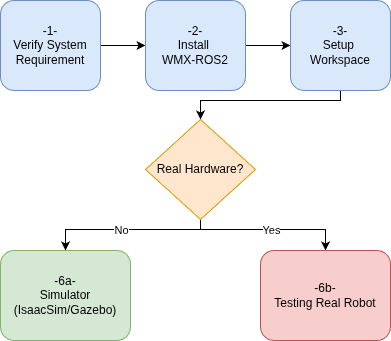
Getting Started — step-by-step flow

Getting Started — step-by-step flow#

On this page

System Requirements
Install ROS2
Install Dependencies
Create Workspace and Build
Configure Environment
Testing in Simulation
Testing with Real Robot
Communication Overview

previous

WMX ROS2 Documentation

next

System Requirements

Movensys

© 2026, MOVENSYS MOVENSYS. All rights reserved.

Last updated: Mar 13, 2026

MOVENSYS.com Privacy Policy