
MoveIt2 Motion Planning#
Overview#
MoveIt2 is the primary motion-planning integration for WMX ROS2. The
movensys-manipulator
repository provides the movensys_manipulator_moveit_config package, which
wraps MoveIt2 with a high-level service API and executes the planned motion on
the robot through the WMX ROS2 stack.
MoveIt2 produces collision-aware, time-parameterized trajectories; WMX runs them on a deterministic real-time cycle. The same configuration drives three execution modes: pure simulation (Isaac Sim or Gazebo), hardware-in-the-loop (simulator visuals with the real WMX runtime), and real robot control over EtherCAT.
Architecture#
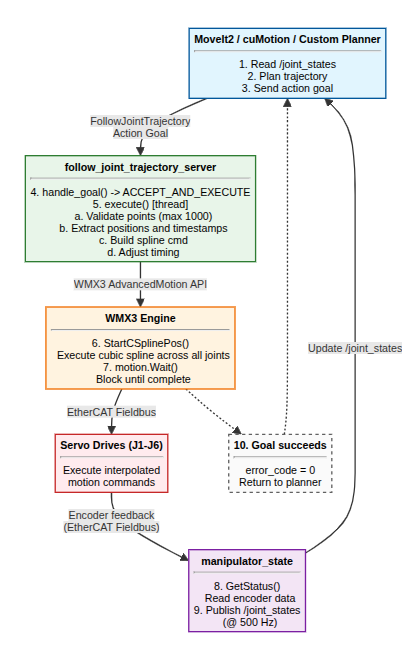
The trajectory_api node (in movensys_manipulator_moveit_config) hosts
a MoveIt2 MoveGroupInterface client and exposes simple pose/joint services
under /wmx/moveit2/. For each request it:
Sets a joint or Cartesian target on the move group.
Plans with MoveIt2 (OMPL), or computes a Cartesian path for straight-line moves.
Time-parameterizes the trajectory with Time-Optimal Trajectory Generation (TOTG), applying velocity and acceleration scaling.
Executes it, which streams the trajectory to the WMX
joint_trajectory_controllerfor deterministic execution on the servos.
It also publishes the live end-effector pose on /wmx/moveit2/eef_pose
(geometry_msgs/PoseStamped) and orientation on /wmx/moveit2/eef_rpy
(geometry_msgs/Vector3Stamped), and calls /wmx/set_gripper for gripper
actions.
Setup#
The MoveIt2 integration runs inside the movensys-manipulator Docker
container. After cloning the repository and configuring the host environment,
enter the container with the mros helper. Key environment variables:
Variable |
Purpose |
|---|---|
|
|
|
|
|
|
|
|
See the movensys-manipulator README for the full host setup, CycloneDDS buffer tuning, and container build steps.
Running MoveIt2#
Bring up the MoveIt2 stack (commands run through the mros container
helper). For a real robot:
# Start MoveIt2 (move_group + trajectory_api services)
mros ros2 launch movensys_manipulator_moveit_config moveit.launch.py

# Run a trajectory test, or send your own service calls
mros ros2 launch movensys_manipulator_moveit_config trajectory_test.launch.py
For simulation or hardware-in-the-loop, start the simulator bridge first and
pass use_sim_time:=true:
mros ros2 launch movensys_manipulator_moveit_config sim_bridge.launch.py \
     simulator:=isaacsim use_sim_time:=true
mros ros2 launch movensys_manipulator_moveit_config moveit.launch.py \
     use_sim_time:=true
Service API#
The trajectory_api node exposes these services. Pose services use
movensys_manipulator_moveit_config/srv/MovePose (pos = XYZ metres,
ori = roll/pitch/yaw radians); joint services use MoveJoints.
Service |
Type |
Purpose |
|---|---|---|
|
|
Read the current end-effector pose ( |
|
|
Cartesian move to an absolute pose (base frame) |
|
|
Cartesian move by a relative offset (base frame) |
|
|
Cartesian move by a relative offset (tool frame) |
|
|
Plan to a pose target in joint space (base frame) |
|
|
Absolute joint-space move |
|
|
Relative (incremental) joint-space move |
Examples#
Read the current end-effector pose:
mros ros2 service call /wmx/moveit2/get_eef_pose \
     movensys_manipulator_moveit_config/srv/GetEefPose '"{}"'
Absolute Cartesian move (base frame):
mros ros2 service call /wmx/moveit2/absolute_base_eef_cartesian \
     movensys_manipulator_moveit_config/srv/MovePose \
     '"{pos: [-0.158, -0.071, 0.346], ori: [3.14159265, 0.0, -3.14159265]}"'
Absolute joint move:
mros ros2 service call /wmx/moveit2/joint_movement \
     movensys_manipulator_moveit_config/srv/MoveJoints \
     '"{joint_names: [joint1, joint2, joint3, joint4, joint5, joint6], joint_values: [0.0, 0.0, -1.57, 0.0, 1.57, 0.0]}"'
Open or close the gripper:
mros ros2 service call /wmx/set_gripper std_srvs/srv/SetBool '"{data: true}"'
Trajectory Execution#
Planned trajectories are streamed to the WMX joint_trajectory_controller,
which executes them with cubic spline interpolation
(AdvancedMotion::StartCSplinePos()) on a deterministic real-time cycle.
See ROS2 Actions for the execution details and limits.
See Also#
Isaac cuMotion Accelerated Planning – GPU-accelerated planning with Isaac cuMotion
Building Custom Applications – drive the
/wmx/moveit2/*services from your own codeThe movensys-manipulator repository for the full trajectory, AprilTag, Nvblox, and YOLO walkthroughs